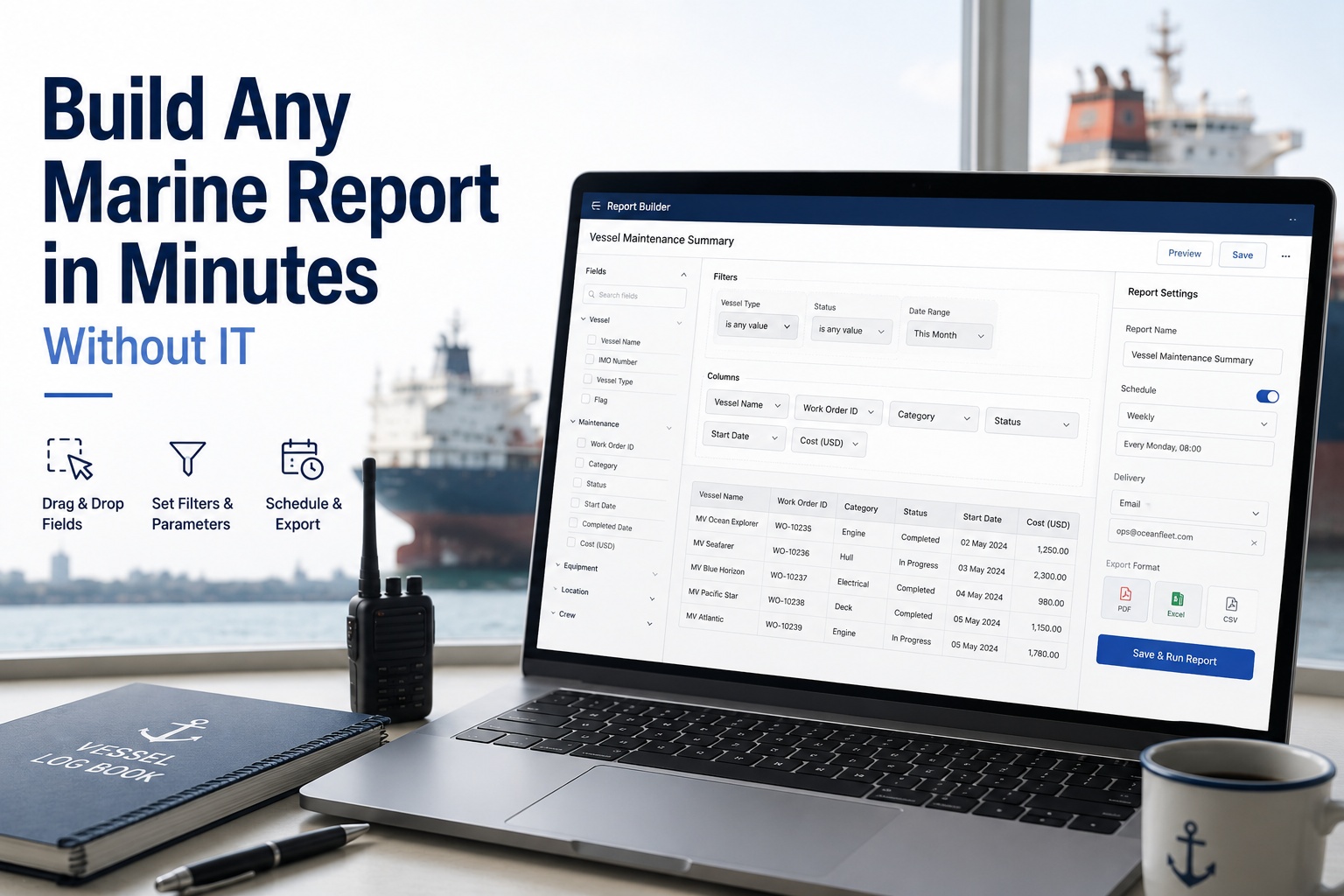
Every fleet manager has lived this: the board wants a report showing detainable deficiencies by vessel and flag for the last quarter, the data all exists in the system, and the answer is "I'll raise a request with IT and get it in a few days." By the time the report arrives, the question has moved on, or the format is wrong, or someone wants the same thing sliced by fleet instead of flag and the whole cycle starts again. The bottleneck is never the data — it is the gap between the person who has the question and the person who can query the database. A custom report builder closes that gap by putting report creation in the hands of the people who need the answers. Drag the fields you want, set the filters that matter, choose how it's grouped, and export it to PDF for the board, Excel for the superintendent, or CSV for the next system — without writing a query, opening a ticket, or waiting on anyone. Schedule it to arrive every Monday morning and you never build it again. This guide explains what a marine report builder actually does, the pieces that make it work — fields, filters, grouping, scheduling, export — how role-based access keeps it safe across a fleet, and why moving reporting out of IT's queue changes how a fleet operates. Start free trial or book a demo to build your first fleet report in minutes.
REPORTS & SYSTEM · REPORT BUILDER
Build Any Marine Report in Minutes. No IT Ticket.
Drag the fields, set the filters, group it your way, and export to PDF, Excel or CSV — or schedule it to land in the right inboxes every Monday. The data was always there. Now the answer doesn't wait in a queue.
The Real Problem Isn't Data. It's Access.
A modern fleet management system already holds everything — every inspection, certificate, defect, work order, running hour and port call. The frustration is never that the information is missing; it is that turning it into the specific report someone needs requires a technical skill most of the people asking don't have.
Waiting on IT
Every custom cut of the data means a request, a queue, and a wait — so the report arrives after the moment that needed it has passed, or the person gives up and works from a stale spreadsheet.
Endless manual rework
The same report gets rebuilt by hand every week or month — exported, reformatted, re-sent — burning hours on work a schedule should do automatically.
Generic tools that don't fit
Off-the-shelf report formats force you to adapt to their limitations instead of answering your specific question — the wrong columns, the wrong grouping, the wrong slice.
Inconsistent numbers
When everyone builds their own spreadsheet, the same metric comes out differently in two reports, and meetings turn into arguments about whose figure is right.
i
A custom report builder answers your specific questions instead of forcing you to adapt to a generic tool's limitations. That is the whole point of self-service reporting: it saves significant time by eliminating manual data manipulation and the wait for IT support, putting report creation directly in the hands of the business users who understand the question. Technical resources still help with the deepest customisation, but a superintendent, a compliance manager or a fleet director can build, filter and schedule the reports they need themselves — without SQL, without a ticket, and without a developer in the loop for routine work.
The Pieces That Make It Work
A report builder is only as good as its building blocks. These are the capabilities that turn a raw database into a report anyone can assemble, and the ones worth checking against your own needs.
01
Drag-and-drop field selection
Pull the columns you want onto a spreadsheet-like canvas — vessel, flag, certificate type, defect category, survey date, running hours — and arrange them, with no coding required on your part. The interface is built so someone without technical skills can create a report visually.
02
Dynamic filters and parameters
Refine the results with filters that matter — a date range, a specific fleet, a flag state, an open-versus-closed status — including prompts the reader can change at view time to explore the data rather than just read it. Advanced filtering is what turns one report into many.
03
Calculated fields and grouping
Derive custom metrics from the raw fields — a deficiency rate, a days-to-expiry, an average close-out time — and group and subtotal by vessel, fleet or category, so the report answers a question rather than just listing rows.
04
Charts and tables together
Add tables, charts and graphs to make the report clear, not just complete — a trend line of defects over time next to the detail table, so the reader sees the pattern and the particulars in one view.
05
Branding and pixel-perfect layout
Control logos, colours and layout for client-facing or executive-ready output, with precise positioning, pagination, headers, footers and page numbers for print-ready PDFs — because a board report and a data extract have different standards.
06
Reusable templates
Save a report structure and clone it across vessels, fleets or reporting periods, so hours of rebuild work each cycle become a single click. The monthly compliance pack becomes a template, not a monthly project.
Stop raising tickets for reports
Build the Report You Need Right Now
The next time the board asks for deficiencies by flag, or a superintendent wants certificates expiring in ninety days across a fleet, build it yourself in minutes and export it in the format they want. Book a demo and create your first report live against real fleet data.
Export in the Format Each Audience Needs
One report, several destinations. The value of flexible export is that the same underlying data serves the boardroom, the superintendent's desk and the next system in the chain without being rebuilt three times.
PDF
For people
Print-ready layouts with headers, footers, page numbers and high-resolution charts — the format for a board pack, a client deliverable, or an inspection report that needs to look finished and stay fixed.
Excel
For analysis
A full workbook with column widths, cell formatting and embedded charts, so a superintendent can keep working the numbers — sorting, pivoting, adding their own calculations — rather than re-keying them.
CSV
For systems
Clean data files for downstream pipelines, ETL tools and integrations, so a report can feed another system — a charterer's platform, a class portal, an internal data warehouse — without manual handling.
Schedule It Once, Never Build It Again
The single biggest time saving isn't building a report faster — it's not building it at all after the first time. Automated scheduling turns a recurring chore into a standing arrangement.
Any cadence
Daily, weekly, monthly, yearly or a custom schedule — the Monday-morning fleet status, the month-end compliance pack, the quarterly board report all arrive on their own timetable without anyone remembering to run them.
Straight to the right inboxes
Delivered automatically to a distribution list in the format each recipient needs, so the superintendents get Excel and the board gets PDF, from the same scheduled report.
Multiple schedules per report
The same report can run on several schedules to different lists in different formats — a weekly internal version and a monthly external one — without maintaining two separate reports.
Managed in one place
Pause, edit or delete schedules from a single view, with oversight across the whole organisation, so nobody is left receiving a report that's no longer needed or missing one that is.
Scheduled delivery is the feature that quietly pays for the whole thing. A report you build once and receive automatically every Monday at eight is a report you never spend another minute on — no exporting, no reformatting, no forwarding. Across a fleet with a dozen recurring reports going to different audiences, that is hundreds of hours a year returned to the people who were assembling them by hand. And because everyone is working from the same scheduled, single-source report rather than their own spreadsheet, the numbers finally agree.
Safe Across a Fleet: Role-Based Access
Self-service reporting raises an obvious question — if anyone can build a report, can anyone see everything? The answer is role-based access control, which is what makes putting report-building in many hands safe rather than risky.
Role-based visibility
Teams access only the reports and data relevant to their role, with no need to duplicate or rebuild. A vessel manager sees their vessels; a fleet director sees the fleet; a charterer sees only what's shared with them.
Forced security filters
Hidden filters based on the logged-in user are injected automatically and cannot be overridden — so a user building their own report still only ever sees the data they're entitled to, without having to be trusted to filter correctly.
Governed self-service
The balance that makes it work: business users get the freedom to build what they need, while the organisation keeps consistent, governed definitions underneath, so freedom at the edges doesn't fracture the data in the middle.
One source of truth
Because every report draws from the same live system rather than a personal export, the figures are consistent by construction — the same metric means the same thing in every report, for every role.
The larger shift here is organisational, not just technical. When reporting lives in IT's queue, the people closest to the operation are dependent on a translation step to see their own data, and the natural response is to hoard spreadsheets and work around the system. When reporting is self-service but governed, that dependency dissolves: the compliance manager builds the PSC-readiness report themselves, the superintendent schedules the fleet's certificate-expiry pack, the director assembles the board summary — each from the same trusted data, each without waiting on anyone, each within the access their role permits. The reporting bottleneck that shaped how information moved through the fleet simply stops existing. What replaces it is a fleet where the answer to "can we see the numbers on this" is minutes away, in the right format, and the same for everyone who looks. Book a demo to build a live fleet report in minutes.
Frequently Asked Questions
Do I need technical skills to build a report?
No. A custom report builder uses a drag-and-drop interface that lets you select data fields, apply filters and arrange columns visually, with no coding or SQL required. The whole point of self-service reporting is that business users — superintendents, compliance managers, fleet directors — build the reports they need themselves, without opening an IT ticket. Technical resources are still available for the deepest customisation, but routine reports are yours to build.
Book a demo.
What can I put in a marine report?
Any data the system holds — vessels, flags, fleets, certificates and expiry dates, inspection findings and defect categories, survey dates, work orders, running hours, port calls and more. You drag in the fields you want, filter by date range, fleet, flag or status, add calculated metrics like a deficiency rate or days-to-expiry, group and subtotal, and add charts alongside the detail. The report answers your specific question rather than fitting a fixed template.
Book a demo.
What formats can I export to?
PDF, Excel and CSV, each suited to a different audience. PDF gives print-ready layouts with headers, footers, page numbers and high-resolution charts for board packs and client deliverables; Excel produces a full workbook with formatting and embedded charts for further analysis; CSV provides clean data files for downstream systems, pipelines and integrations. The same report can be exported in whichever format each recipient needs.
Book a demo.
Can reports be sent out automatically?
Yes. Automated scheduling delivers a report on any cadence — daily, weekly, monthly, yearly or custom — straight to a distribution list in the format each recipient needs. A report can run on multiple schedules to different lists in different formats, and all schedules are managed in one place where they can be paused, edited or deleted. You build the report once and it arrives on its own thereafter.
Book a demo.
Can I reuse a report structure?
Yes, through templates. Save a report's structure and clone it across vessels, fleets or reporting periods, turning what would be hours of rebuild work each cycle into a single click. A monthly compliance pack or a standard vessel status report becomes a reusable template rather than something assembled from scratch every time, which also keeps the format consistent across the fleet.
Book a demo.
How does it stay secure if anyone can build reports?
Through role-based access control. Users only access the reports and data relevant to their role, and forced security filters based on the logged-in user are injected automatically and cannot be overridden — so someone building their own report still sees only the data they're entitled to. This governed self-service model gives business users freedom to build while keeping consistent definitions and access control underneath.
Book a demo.
Will everyone's numbers finally match?
Yes, because every report draws from the same live system rather than individual spreadsheets. When reports are built on one governed data source with consistent definitions, the same metric means the same thing in every report and for every role — which ends the meetings that turn into arguments about whose figure is right. Scheduled, single-source reports replace the patchwork of personal exports.
Book a demo.
Can I still add charts, not just tables?
Yes. A report builder lets you combine tables, charts and graphs in one report, so a trend line of defects or expiries over time sits alongside the detail table. This makes the report clearer rather than just complete, letting the reader see the pattern and the specifics together, and interactive filters let them explore the data at view time rather than only reading a fixed output.
Book a demo.
Put the Answers Where the Questions Are.
Marine Inspection's custom report builder lets superintendents, compliance managers and fleet directors drag fields, set filters, add calculated metrics and charts, and export to PDF, Excel or CSV — then schedule the report to arrive automatically, in the right format, for the right people. Role-based access and forced security filters keep it safe across the fleet, and one governed data source keeps everyone's numbers the same. Stop raising tickets for reports and start building them.

.png)
.png)